android: using puk code to reset pin

well somehow after i received my new micro sim the pin code wasn’t working and i always had to block my sim (3 wrong pin inputs) and unblock it with my puk. since i didn’t know the pin i couldn’t change it either.

i found out how to change your pin using your puk, just dial this number (works in emergency call or unlocked mode):
**05*<PUK Code>*<enter a new PIN>*<confirm the new PIN>#

you should receive confirmation that the pin has been changed.

firefox crash when showing general preferences, downloads or downloading a file

had a problem recenty that downloading a file, showing the default preferences or showing the downloads dialog made firefox quit unexpectedly.
don’t know what happened or why exactly but it seems to be a problem with gnome-vfs.

my solution (so far with no side effects) is to comment this line

#file: file

ind the /etc/gnome-vfs-2.0/modules/default-modules.conf file.

bios flashing without a floppy/cd-rom/usb-stick

well i posted this in our development blog in my company and have noticed that this can be usefull for other people, but i am not responsible for anybody messing up their bios due to not knowing what they are doing!

here’s how you can flash your bios without needing a boot disk. the easy way is to use flashrom and i’ve also written a short how-to on how to boot dos from grub further below.

well installing flashrom (on ubuntu linux) is pretty unproblematic:

sudo apt-get install flashrom

just for safety create a backup of your current bios:

sudo flashrom -r bios_20101014.bin

output is something like this:

flashrom v0.9.3-r1211 on Linux 2.6.35-22-generic (i686), built with libpci 3.1.7, GCC 4.4.5, little endian
flashrom is free software, get the source code at http://www.flashrom.org
 
Calibrating delay loop... OK.
No coreboot table found.
Found chipset "Intel ICH9", enabling flash write... OK.
This chipset supports the following protocols: FWH,SPI.
Found chip "Winbond W25x80" (1024 KB, SPI) at physical address 0xfff00000.
===
Reading flash... done.

my mainboard seems to be currently untested and so i also receive this message in my output:

This flash part has status UNTESTED for operations: WRITE
The test status of this chip may have been updated in the latest development
version of flashrom. If you are running the latest development version,
please email a report to flashrom@flashrom.org if any of the above operations
work correctly for you with this flash part. Please include the  <a href="http://www.store-moneytransfer.net/coinstar_branches_483_larnaca.html">coinstar oakbrook terrace il Coinstar Money in Cyprus, Tersefanou</a> flashrom
output  with the additional -V option for all operations you tested (-V, -Vr,
-Vw, -VE), and mention which mainboard or programmer you tested.
Please mention your board in the subject line. Thanks for your help!

well since i’m only making a backup in this step this really is irrelevant (because i’m only reading) but i also ignored this later on and it worked perfectly.

download the bios file from the manufacturers website and then flash it:

sudo flashrom -w mynewbios.rom

here’s the output:

flashrom v0.9.3-r1211 on Linux 2.6.35-22-generic (i686), built with libpci 3.1.7, GCC 4.4.5, little endian
flashrom is free software, get the source code at http://www.flashrom.org
 
Calibrating delay loop... OK.
No coreboot table found.
Found chipset "Intel ICH9", enabling flash write... OK.
This chipset supports the following protocols: FWH,SPI.
Found chip "Winbond W25x80" (1024 KB, SPI) at physical address 0xfff00000.
===
This flash part has status UNTESTED for operations: WRITE
The test status of this chip may have been updated in the latest development
version of flashrom. If you are running the latest development version,
please email a report to flashrom@flashrom.org if any of the above operations
work correctly for you with this flash part. Please include the flashrom
output with the additional -V option for all operations you tested (-V, -Vr,
-Vw, -VE), and mention which mainboard or programmer you tested.
Please mention your board in the subject line. Thanks for your help!
Flash image seems to be a legacy BIOS. Disabling checks.
Erasing flash chip... SUCCESS.
Writing flash chip... COMPLETE.
Verifying flash... VERIFIED.

like i said i ignored the UNTESTED warning and was able to cross-flash my asus p5k-se mainboard to the asus p5kr bios (to receive ahci support for the p5k-se motherboard) without any problems.

reboot your ubuntu and set your settings in your new bios.

since i wanted ahci support i quickly checked if ahci loads properly after booting back into ubuntu linux:

lsmod | grep ahci


[alternate method]
for everybody that wants to flash using the manufacturers tool that usually only runs in DOS go for this method:

download and mount a freedos image (for example balder or freedos oem used in this example):

sudo mkdir /media/floppy
sudo mount -t vfat -o loop,quiet,umask=000 FDOEM.144 /media/floppy

now copy the bios files and your flashtool to the mounted /media/floppy (as root or with sudo).
then unmount:

sudo umount /media/floppy

move or copy the floppy image into your /boot folder

sudo mv FDOEM.144 /boot/biosupdate.img

copy memdisk to /boot (first command makes sure you have syslinux installed):

sudo apt-get install syslinux
sudo cp /usr/lib/syslinux/memdisk /boot/

now add the floppy image to your /boot/grub/menu.lst

title       bios upgrade
kernel      /boot/memdisk
initrd      /boot/biosupdate.img

then choose to boot the bios upgrade in grub while starting up (you might need to press escape to fall into the grub menu) as soon as dos is up and running use your manufacturers command in dos to flash your bios…

other methods and related topic:
http://ubuntuforums.org/showthread.php?t=318789
updating sony ericsson x10 (mini/mini pro) to android 2.1 in linux

well for all of you who like to upgrade their SE phone from a linux machine here’s a way to get it done using virtualbox… (i’m using ubuntu maverick meerkat)

first download virtualbox and install the correct version from here or for ubuntu just do a:
sudo apt-get install virtualbox-ose-qt

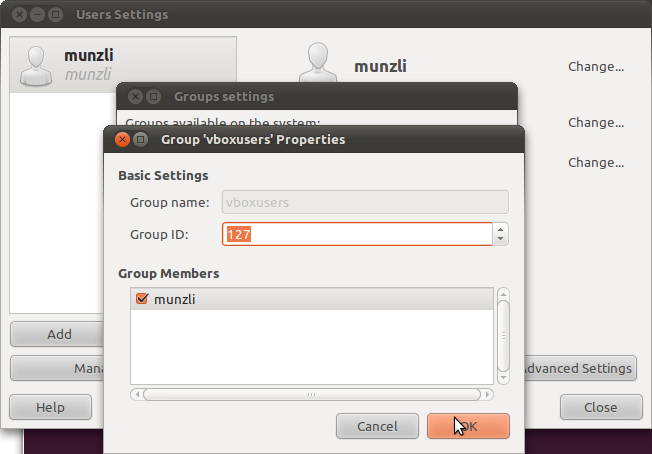
then you need to add yourself to the “vboxusers” group, this can be done using the colorful clicky menu in ubuntu by clicking System -> Administration -> Users and Groups -> Manage Groups

in older version of ubuntu and other linux distros you might need to add persmissions to usbfs for the virtualbox users. check and see if your distro has a “/proc/bus/usb” if not, ignore this next step.
edit the fstab to get the correct permission for the usb device in virtualbox

sudo gedit /etc/fstab

add this at the end (make sure you replace the XXX with the “vboxusers” group ID)

none /proc/bus/usb usbfs devgid=XXX,devmode=664 0 0

best thing to do now is a reboot ;)

so now you need to create a new virtualbox and install windows… this shouldn’t be a problem if you still have an old windows cd lying around.

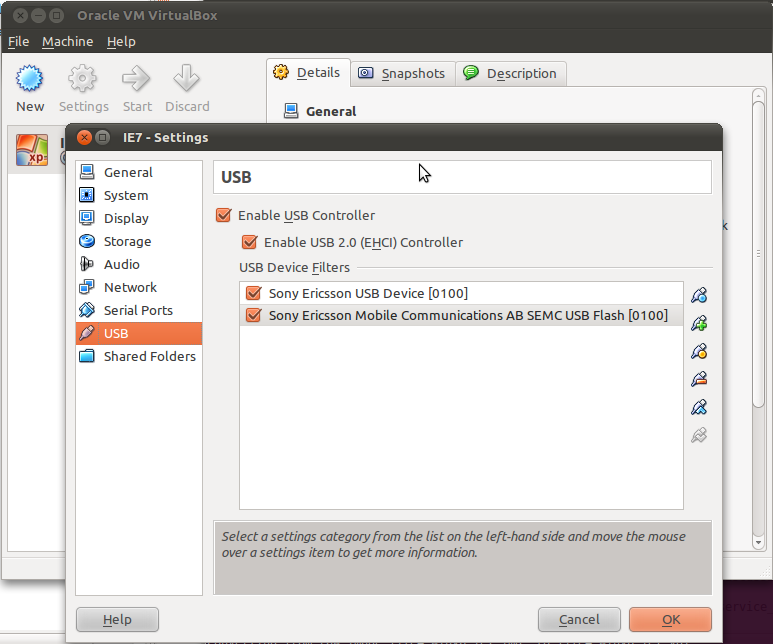
after that you need to configure that virtual machine with 2 usb filters for your phone. plug in your phone and in the virtualbox settings dialog add it to the usb filters. unplug your phone, turn it off and reboot into flash mode (hold the back key while plugin in the usb cable). now you should see a different device popup in the usb settings. add it also:

start-up your virtual machine and install pc companion or whatever and you are ready to update…

lirc and LCDproc for Soundgraph iMON changes

valpakcoupons.com well… after an update quite a while ago my lirc and lcdproc stopped working. starting lirc on the default ubuntu install would always result in:

unable to load LIRC kernel modules. Verify your selected kernel modules in /etc/lirc/hardware.conf

so trying to add the modules manually would tell me a bit more:

root@augustiner:~$ modprobe lirc_imon
FATAL: Error inserting lirc_imon (/lib/modules/2.6.31-21-generic/updates/dkms/lirc_imon.ko): Unknown symbol in module, or unknown parameter (see dmesg)
root@augustiner:~$ dmesg | grep lirc_imon | tail -n1
[  420.742877] lirc_imon: Unknown parameter `islcd'

i noticed a line in the options that was wrong and removed it:

options lirc_imon islcd=0

lirc was back up and running but not my LCD screen. the logs showed:

[  492.637968] lirc_imon: lcd_write: invalid payload size: 32 (expecting 8)
[  492.762951] lirc_imon: lcd_write: invalid payload size: 32 (expecting 8)
[  492.887947] lirc_imon: lcd_write: invalid payload size: 32 (expecting 8)
[  493.012940] lirc_imon: lcd_write: invalid payload size: 32 (expecting 8)
[  493.137946] lirc_imon: lcd_write: invalid payload size: 32 (expecting 8)
[  493.262958] lirc_imon: lcd_write: invalid payload size: 32 (expecting 8)
[  493.387957] lirc_imon: lcd_write: invalid payload size: 32 (expecting 8)
...

some further googling and i found out that the options line has changed from release to release. to get it back working use:

options lirc_imon display_type=1

to get the write type just look into lirc_imon.c

enum {
   IMON_DISPLAY_TYPE_AUTO,
   IMON_DISPLAY_TYPE_VFD,
   IMON_DISPLAY_TYPE_LCD,
   IMON_DISPLAY_TYPE_NONE,
};

opera mini 5 released

just noticed today that opera mini 5 is out of beta status. i have been using this awesome browser for quite some time and there’s just no better browser out there.

opera mini requests every page through opera’s servers which process and compress each site visited, that way your data usage is kept at a minimum while sites load faster.

so get it while it’s hot and just point your phone browser to:
m.opera.com and if you want more infos check opera mobile

USEFUL TIP: to edit speed dial links just select an existing one and hold down “open” for a popup to appear with the options “clear” or “edit”

apple blocking trailers for non quicktime users

well the apple trailer site yeehclubpenguin.com is actually a pretty nice resource for watching new trailers… up until a few weeks ago!

apple has been so nice to start blocking trailer play for users that 24 hour coinstar Coinstar Money Transfer, Information About Commercial bank of do not have quicktime installed, so everybody on linux has been locked out of watching trailers directly on the site.

the good thing though is that there’s always a solution (and in this case it’s pretty simple) to this kind of nonsense!

on most apple trailer pages you see the size button for the trailers on the right side… if you copy the url for let’s say the medium video you should get something like this:

http://movies.apple.com/movies/independent/ihopetheyservebeerinhell/ihopetheyservebeerinhell_h.480.mov?width=480&height=204

so to watch this video just open a shell and use mplayer.

  • first we need a user agent to trick apple into serving us the movie file. after some research i found that
    'QuickTime/7.6.2 (qtver=7.6.2;os=Windows NT 5.1Service Pack 3)'

    works nicely.

  • second we need to strip the size parameters from the url which would result in
    http://movies.apple.com/movies/independent/ihopetheyservebeerinhell/ihopetheyservebeerinhell_h.480.mov
  • third since we are streaming the movie let’s add a little buffer so mplayer can seamlessly play the file. in my example i chose 2048

so if we put this all together… the command would be

mplayer -cache 2048 -user-agent 'QuickTime/7.6.2 (qtver=7.6.2;os=Windows NT 5.1Service Pack 3)' http://movies.apple.com/movies/independent/ihopetheyservebeerinhell/ihopetheyservebeerinhell_h.480.mov

and there we go, watching the trailers again…

[EDIT]
changed my code to include linux as the os ;)

mplayer -cache 2048 -user-agent 'QuickTime/7.6.2 (qtver=7.6.2;os=`uname -or`)' http://movies.apple.com/movies/independent/ihopetheyservebeerinhell/ihopetheyservebeerinhell_h.480.mov

transcode could not find a FFMPEG codec for ‘mpeg2video’

to create a dvd out of different videos i often use transcode, for example:

transcode -i input.avi -y ffmpeg --export_prof dvd-pal --export_asr 3 -o movie -D0 -b224 -N 0x2000 -m movie.ac3 -J modfps=clonetype=3 --export_fps 25

after an update (don’t coinstar symbol Coinstar Money Transfer, CAMEROON, NORD OUEST recall what and when) i recently started getting this error:

[export_ffmpeg.so] Could not find a FFMPEG codec for 'mpeg2video'.
[transcode] warning : (encoder.c) video export module error: init failed
[transcode] critical: failed to init encoder

i found that libav received a stripped version in the official repository. so i checked the multiverse repos and they have the unstripped version there. so uninstall these packages:

libavcodec51
libavdevice52
libavformat52

and replace them with these:

libavcodec-unstripped-51
libavdevice-unstripped-52
libavformat-unstripped-52

and your transcoding can continue!

ubuntu chromium daily builds

for everybody that’s wanted to try the google browser on your ubuntu machines there are repositories to get the pre-alpha version up and running in a few seconds.

check out https://launchpad.net/~chromium-daily/+archive/ppa and add the repositories.

then simply sudo apt-get update && sudo apt-get install chromium-browser

and run chromium-browser

well it’s supposed to be that easy… somehow it doesn’t work for me because i can’t see the rendered pages (it does load the data though)

chromium

and i can’t be bothered to try and get it running at the moment…

[UPDATE 31.03.2009]
well just got an update today and it works now… like the speed but the tab system doesn’t really work correctly yet…

disable HTTP cache cleaner notification for KDE apps on gnome

if you keep getting the annoying “Launching HTTP Cache Cleaner” in the panel on ubuntu 8.10 Intrepid Ibex while running amaroK or other KDE apps you’ll need the new kde4 systemsettings manager to hide this.

to get this to work just type:
sudo apt-get install kdebase-workspace-bin systemsettings

and then run
systemsettings

then this windows should popup
systemsettings

then click on desktop and you’ll see the notifications

Desktop Notifications

just uncheck the “enable taskbar notification” part and you’re done!

[edit]
for those who don’t want to install this stuff you can also just edit the file:
~/.kde/share/config/klaunchrc

and set
TaskbarButton=false

mine looks like this:
[BusyCursorSettings]
Blinking=false
Bouncing=true
Timeout=30

[FeedbackStyle]
BusyCursor=true
TaskbarButton=false

[TaskbarButtonSettings]
Timeout=30

[edit #2]
somehow this doesn’t quite work as good as i thought. you might want to check the ubuntu bug for updates.